
What a Ronin swap actually is
When people say ronin swap, they mean one of two doors into the same room. Door one: the swap feature built directly into the Ronin Wallet extension and the mobile app. Door two: Katana, the decentralized exchange that has lived on Ronin since 2021 and is now merged into the official Ronin web app. Both doors lead to the same liquidity — the wallet's swap tab is essentially a front-end for Katana's smart contracts. Sky Mavis confirmed this merge in the official docs: Katana and Ronin Wallet were combined, and the integrated feature is called Wallet Swap.
That matters because it means you don't choose between "wallet swap" and "Katana swap" on quality — you choose on convenience. The wallet is faster for a quick trade; the full Katana interface at the Ronin web app gives you more controls, charts, and pool data. I've been auditing DeFi front-ends since 2017, and this is one of the cleaner setups I've seen: one liquidity source, two skins, fewer places for a phishing clone to wedge itself in. Fewer — not zero. We'll get to the scams.
AMMs and liquidity pools, explained on fingers
Katana is an AMM — an automated market maker. There's no order book and no human on the other side of your trade. Instead, other users have deposited pairs of tokens (say, RON and AXS) into a shared pot called a liquidity pool. A formula keeps the two sides balanced: when you pull AXS out, you push RON in, and the price shifts automatically along a curve. The bigger the pool, the less your trade moves the price.
Think of it as a currency-exchange kiosk with a self-adjusting rate. If the kiosk holds a mountain of both currencies, your $100 exchange barely dents the rate. If it holds a shoebox's worth, your $100 visibly moves it — and you eat that movement. That movement has a name, price impact, and it's the single most misunderstood number on any swap screen.
A swap is non-custodial: tokens leave your wallet and arrive in your wallet within one transaction. Nobody holds your funds in between — unlike a centralized exchange, where you deposit first and trade IOUs on the exchange's books. If you don't have a wallet yet, start with the guide on how to create a Ronin Wallet before touching any DEX.
How to swap RON for AXS, step by step
Here's the full walkthrough using the wallet's built-in swap — the flow is nearly identical in the extension, the mobile app, and the Katana interface on the Ronin web app. I'm using RON→AXS as the example because it's the deepest, most liquid route on the network.
Open the swap tab
In the Ronin Wallet extension or app, hit Swap. You'll see two fields: You sell on top, You receive below. Make sure you're in your intended account — check the
ronin:address prefix.Pick your token pair
Set the top field to RON and the bottom to AXS. Select tokens from the built-in list rather than pasting random contract addresses — the curated list filters out most impostor tokens.
Enter the amount
Type an amount or tap 25% / 50% / Max. Resist Max when selling RON: gas on Ronin is paid in RON, and the interface usually reserves a little for fees, but leaving a visible buffer (a few RON) is the habit that saves you later.
Check the quoted rate
The rate line reads something like 1 RON = X AXS. Sanity-check it against a price site or an exchange quote. If the rate is more than ~1% off the market price on a small trade, stop — you may be on a thin pool or a fake token.
Review price impact and minimum received
Expand the details. Price impact shows how much your own trade moves the pool price — under 0.5% is normal for RON/AXS. Minimum received is your worst-case output given your slippage setting; if the pool can't deliver at least that, the transaction fails instead of filling badly.
Set slippage tolerance
The gear icon opens transaction settings. Auto is fine for major pairs; for volatile moments the official Ronin guidance suggests nudging it to a custom 1–3%. Never park it at 10%+ "to make it go through" — that's an open invitation to be front-run.
Confirm and sign
Hit Swap, then approve the transaction in the wallet pop-up. Read the pop-up: it shows what you send, what you should get, and the gas fee in RON. Signing is the point of no return.
Verify the result
The AXS lands in the same wallet within seconds. Check the transaction on the Ronin explorer (app.roninchain.com) if you want the receipt — amounts in, amounts out, fee paid.
The classic trap: you cannot swap your last token without gas. Every Ronin transaction — including a swap out of RON — costs a small amount of RON. If you swap 100% of your RON into AXS, you're locked: no RON, no gas, no way to move the AXS either. Always keep a few RON untouched. If you need RON, see the guide on the RON token and where to get it.
Decoding the swap screen, field by field
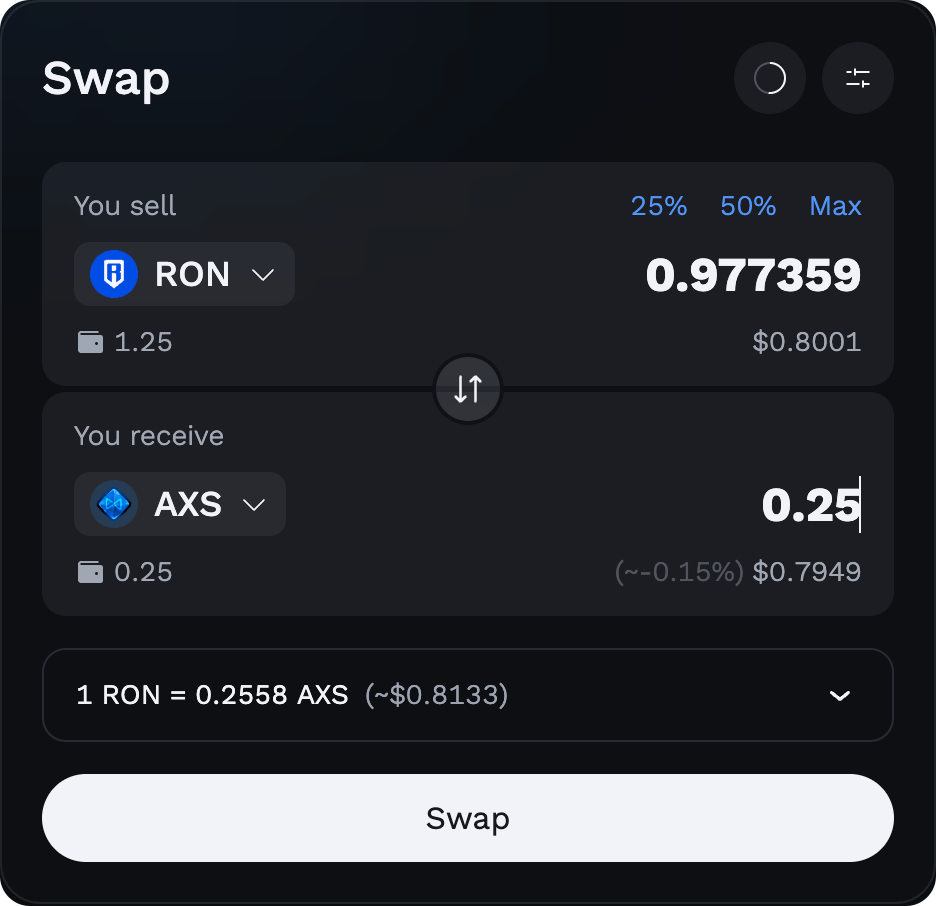
The screenshot above shows the standard RON→AXS swap interface. It looks minimal, but every element carries information you're expected to check before signing. Here's the translation from UI to plain English.
"You sell" / "You receive"
Top field is what leaves your wallet, bottom is the estimate of what arrives. The bottom number is an estimate — the real output depends on pool state at execution time, bounded by your minimum-received floor.
25% / 50% / Max buttons
Quick-fill shortcuts based on your balance of the sell token. Handy, but Max on RON is where people strand themselves — leave gas money. On other tokens, Max is harmless.
The rate line (1 RON = X AXS)
The current effective exchange rate, including the pool's state but not your price impact. Tap it to flip the direction (1 AXS = Y RON). If this number surprises you, don't sign — investigate.
Price impact %
How much your own order moves the pool. It's a function of your size versus pool depth, not volatility. Big order + shallow pool = big impact, and that loss is yours the moment you sign.
Max slippage
Your tolerance for the price moving between quote and execution because of other people's trades. Set via the gear icon: Auto, or Custom (the official docs suggest 1–3% when the default keeps failing).
Network fee (gas)
Paid in RON, typically a fraction of a cent to a few cents. It goes to the network for processing, not to Katana. Shown in the confirmation pop-up before you sign.
One habit worth stealing from auditors: read the confirmation pop-up as if the interface above it lied. The pop-up reflects what the smart contract will actually do. If the pop-up says you're approving an unlimited token allowance when you thought you were swapping 10 RON — that's your cue to reject.
The anatomy of swap fees: who takes what
A DEX swap has five separate costs, and marketing pages love to quote only one of them. According to the official Ronin documentation, the total swap fee on Katana's classic pools is 0.30%, split between liquidity providers and the treasury; newer concentrated-liquidity pools have varying fee tiers per pool. Here's the full cost map.
| Cost | What it is | Who receives it | Typical size |
|---|---|---|---|
| LP fee | The pool's cut of every trade — payment to the people whose tokens you're trading against | Liquidity providers, proportional to their share of the pool | 0.25% on classic Katana pools (per official Ronin docs); varies by fee tier on newer pools |
| Protocol fee | The platform's cut, taken alongside the LP fee | The Ronin/Axie treasury | 0.05% on most pools, per official Ronin docs |
| Gas | Network fee for executing the transaction on-chain | The Ronin network (validators) | Paid in RON; usually cents or less |
| Slippage | Price drift between your quote and execution, caused by other trades landing first | Whoever traded against you at the better price | 0 on quiet pairs; bounded by your max-slippage setting |
| Price impact | The price move caused by your own order against pool depth | Effectively the pool — you get a worse average rate | Near 0% on deep pairs; can be brutal (5–50%+) on illiquid tokens |
Notice that only the first two are "fees" in the honest sense. Slippage and price impact are execution costs that don't appear on any fee schedule, and on a bad trade they can dwarf the 0.30% many times over. This is why a "zero-fee" swap on a thin pool can be far more expensive than a 0.30% swap on a deep one.
Common Ronin tokens you'll actually swap
Ronin's token list is short and gaming-heavy by design. These six cover the overwhelming majority of swap volume on the network.
| Token | What it is | Why people swap it |
|---|---|---|
| RON | Ronin's native coin — gas, staking, base pair | The hub of nearly every route; needed for gas no matter what you trade |
| AXS | Axie Infinity's governance token | Staking, governance, and the classic RON/AXS pair with deep liquidity |
| SLP | Smooth Love Potion — Axie's in-game earn token | Players cash earnings out of SLP; breeders buy in |
| USDC | Dollar-pegged stablecoin (bridged) | The "parking spot" — lock in value without leaving the chain |
| WETH | Wrapped Ether bridged to Ronin | The historical pricing currency of the Axie marketplace |
| PIXEL | Token of the Pixels farming game on Ronin | One of the busiest non-Axie gaming tokens on the network |
A useful mental model: RON is the airport hub. Even when a direct pool between two tokens is thin, the router will typically hop through RON or USDC. Each hop touches another pool and stacks another LP fee, so multi-hop routes on small tokens cost more than the sticker suggests.
Fool-proof warnings: the three ways people lose money swapping
DEX losses almost never come from the DEX itself. They come from users signing things they didn't read. These three patterns account for most of the damage I've seen reported on Ronin.
Fake tokens with the same ticker. Anyone can deploy a token named "AXS" or "USDC" — a ticker is just a text label, not an identity. Scam tokens are seeded with a drop of liquidity so they show a price, then you buy something worthless. Always verify the contract address against the official token list in the wallet or on the Ronin explorer before swapping anything you found via a link, a Discord message, or a search result.
High price impact on illiquid pairs. If the interface shows price impact of 5%, 15%, or a red warning, that is not a glitch — it's the pool telling you your order is too big for it. Signing anyway donates the difference to the pool. Split the order, route through RON or USDC, or use a centralized exchange for size. There is no undo.
Loose slippage on big orders invites front-running. A 10% slippage setting tells the world you'll accept up to 10% worse than quoted. Bots can exploit generous tolerances by trading around your order (a "sandwich"), and you eat the spread — legally, irreversibly, by your own signature. Keep slippage tight (Auto, or 1–3% max per the official guidance) and break large trades into pieces.
Approvals and revoking allowances
The first time you swap a given token (other than the native RON), the contract asks for an approval — permission for the router to move that token from your wallet. It's a separate transaction with its own small gas cost, and it's standard EVM behavior, not a Ronin quirk.
The security angle: many interfaces default to unlimited allowances so you never have to approve again. Convenient, but it means that contract can move that token from your wallet forever — and if the contract is ever compromised, so is your balance. When the wallet offers a choice, approve only the amount you're trading. And once or twice a year, review your active allowances (the Ronin web app and standard allowance-checker tools can list them) and revoke anything you don't recognize or no longer use. Revoking costs a little gas; a drained wallet costs everything.
Approvals granted to a scam site are the number-one drainer mechanic in 2026. If you ever connected your wallet to a dubious dApp — even without swapping — assume an allowance may exist and revoke it. Your seed phrase being safe doesn't help if a contract has standing permission to spend your tokens.
Swap vs bridge vs exchange trade: picking the right tool
These three get mixed up constantly, and using the wrong one wastes fees at best and strands funds at worst.
| Action | What it does | When it's the right tool |
|---|---|---|
| Swap (Katana / Wallet Swap) | Trades one Ronin token for another Ronin token, same chain, same wallet | You already hold assets on Ronin and want a different Ronin asset |
| Bridge (Ronin Bridge) | Moves the same asset between chains — e.g. ETH on Ethereum ↔ WETH on Ronin | Your funds sit on another network and need to get onto (or off) Ronin |
| Exchange trade (CEX) | Buys or sells crypto against fiat or other crypto on a company's order book | You're starting from a bank card, moving serious size, or need fiat out |
The most common combined route for a newcomer: buy RON with fiat on an exchange (the RON token guide covers where it's listed), withdraw to your own ronin: address, then swap on-chain for whatever the game or dApp needs. Bridging is the fallback when an exchange doesn't support direct Ronin withdrawals for your asset. And a sober historical note: bridges are the riskiest link in this chain — Ronin's own bridge suffered a roughly $600 million exploit in March 2022, later fully patched and relaunched with stricter validation. Funds sitting in transit across any bridge carry a category of risk that a simple on-chain swap doesn't.
Troubleshooting: when the swap doesn't go through
Transaction pending or stuck
Ronin blocks are fast, so a genuinely stuck transaction is rare. If a swap sits pending for minutes: check the transaction hash on the explorer first — often it already succeeded and the interface just didn't refresh. If it truly failed, the tokens never left (minus a small gas charge for the failed attempt). Don't blind-fire the same swap three times "to make it work"; you might get three fills when the network catches up.
Insufficient RON for gas
The error message is literal: you don't have enough RON to pay for the transaction, even if the token you're selling is worth thousands. This is the trap flagged earlier — the only fix is getting RON in from outside: withdraw a few RON from an exchange to your address, or have another wallet send you some. Occasional gas-sponsorship promos have appeared for new users on official channels, but never plan around them. Keep a standing RON buffer, always.
Quote expired or price updated
Quotes are snapshots of a moving pool. If you idle on the confirmation screen, the interface refreshes the quote and asks you to re-confirm — that's a safety feature, not a bug. If it happens repeatedly on an active pair, the market is moving fast; either accept the fresher quote quickly or widen slippage slightly (1–3%, not more) and try again.
Swap keeps failing at confirmation
Usual suspects, in order: slippage tolerance too tight for current volatility; a missing token approval (do the approval transaction first, then swap); an outdated wallet version — grab the current build via the official channels listed in our Ronin Wallet app review; or a token with transfer restrictions, which on a curated list is rare but on a pasted contract address is a red flag in itself.
Honest cons: what a DEX swap can't do
I recommend on-chain swaps for what they are — but the marketing around DEXes routinely oversells. Here's the ledger, both sides.
- No fiat. Katana trades token-for-token. Getting money in from a bank, or out to one, requires an exchange or on-ramp regardless.
- Depth is a fraction of a major CEX. For large orders, price impact on Ronin pools will usually cost you more than a top exchange's spread would.
- No support desk, no undo. Fat-finger the amount, buy a fake token, sign a bad approval — nobody can reverse it. Self-custody means the mistakes are yours too.
- Limited universe. You can only swap what lives on Ronin. Tokens from other ecosystems need bridging first.
- In exchange you get: no account, no KYC, no withdrawal permissions, no exchange-insolvency risk, and settlement in seconds to a wallet only you control. For Ronin-native gaming tokens like SLP or PIXEL, the DEX often isn't just the better venue — it's effectively the only liquid one.
The pragmatic setup most experienced users run: a CEX account for fiat and size, plus the wallet (get it via the browser extension or the mobile app) for everything on-chain. Neither replaces the other, whatever either side's marketing says. Also worth noting for EU readers in 2026: MiCA regulates the exchanges and stablecoin issuers you'll touch on the fiat side, but a non-custodial swap in your own wallet involves no licensed intermediary at all — which is precisely why nobody can freeze it, and nobody can refund it.
Ronin swap — FAQ
What is the fee for swapping on Katana?
According to the official Ronin docs, classic Katana pools charge a total swap fee of 0.30% — 0.25% goes to liquidity providers and 0.05% to the treasury. Newer concentrated-liquidity pools use per-pool fee tiers. On top of that you pay network gas in RON, plus whatever slippage and price impact your specific trade incurs.
Is the swap inside Ronin Wallet the same as Katana?
Effectively yes. Sky Mavis merged Katana with the wallet — the Wallet Swap feature in the extension and mobile app routes through the same Katana liquidity as the full Swap page in the Ronin web app. Same pools, same fees, different interface.
Why can't I swap — it says insufficient funds even though I have tokens?
You're out of RON for gas. Every Ronin transaction costs a small amount of RON, regardless of which token you're trading. Send a few RON to your address from an exchange or another wallet and the swap will go through. Then keep a permanent RON buffer so it never happens again.
What slippage should I set?
Leave it on Auto for major pairs like RON/AXS or RON/USDC. If transactions keep failing during volatile moments, the official Ronin guidance suggests a custom setting of roughly 1–3%. Avoid anything near 10% — a loose tolerance is exactly what sandwich bots feed on.
What's the difference between price impact and slippage?
Price impact is the price move your own order causes against the pool's depth — it's visible before you sign and grows with order size. Slippage is drift between your quote and execution caused by other trades landing first. You control slippage with a tolerance setting; you control price impact only by trading smaller or in deeper pools.
How do I avoid buying a fake token?
Pick tokens from the wallet's curated list instead of pasting addresses from links or chat messages, and verify the contract address on the Ronin explorer when in doubt. A ticker like "AXS" or "USDC" can be copied by anyone; the contract address cannot. If a "deal" on a token appeared via DM, it's the bait, not the deal.
Can I buy RON with a credit card through the swap?
No. A DEX swap only trades tokens that are already on-chain. To start from fiat, buy RON on a centralized exchange or on-ramp and withdraw it to your ronin: address — the RON token guide on this site covers the listed venues — then swap on-chain from there.
Is swapping on Ronin safe after the 2022 bridge hack?
The March 2022 incident hit the Ronin Bridge — the cross-chain transfer system — not Katana's swap contracts, and the bridge was patched, audited and relaunched with stricter validator requirements. On-chain swaps carry different risks: fake tokens, bad approvals, and user error. Those are manageable with the checks in this guide; no venue makes them zero.
Sources & official references
- Official Ronin Wallet page — https://wallet.roninchain.com/
- Ronin Docs: Katana overview — https://docs.roninchain.com/apps/katana
- Ronin Docs: Swap tokens on Katana — https://docs.roninchain.com/apps/katana/swap-tokens
- Ronin Support: Katana (Ronin DEX) overview — https://support.roninchain.com/hc/en-us/articles/14037129627163-Katana-Ronin-Dex-Overview
- Ronin App: Swap — https://app.roninchain.com/swap