
What is the Ronin Wallet extension?
The Ronin Wallet extension is a browser add-on built by Sky Mavis that stores your keys for the Ronin network — the EVM chain originally created to get Axie Infinity off congested Ethereum. If you've used MetaMask, the mental model is identical: a small icon in your toolbar that holds your accounts, signs transactions, and pops up whenever a web3 game or DEX wants your approval. The difference is that this one speaks Ronin natively, including its signature ronin: address format — a cosmetic prefix that maps one-to-one onto a standard 0x Ethereum-style address underneath.
It's a non-custodial wallet, and that phrase deserves an on-fingers explanation because it decides who eats the loss when things go wrong. Custodial means someone else (an exchange) holds the keys and you hold an IOU — they can freeze you, but they can also reset your password. Non-custodial means the extension generates a 12-word seed phrase on your machine, encrypts your keys locally, and Sky Mavis never sees any of it. Nobody can confiscate your RON, and nobody can recover it for you either. That trade-off is the whole product.
The extension is one of three ways into the Ronin ecosystem, alongside the Ronin Wallet mobile app and Ronin Waypoint, the email-based sign-in aimed at gamers who don't want to touch a seed phrase. For desktop use — trading on Katana, managing NFTs, bridging assets — the extension is the workhorse, and it's what most Ronin dApps expect to find in your browser. I'll compare all three honestly further down.
Primary network is Ronin, but the extension also handles Ethereum mainnet in bridge contexts — the official Ronin Bridge flow uses it to sign the Ethereum side of a deposit. Check the current network list at docs.roninchain.com before assuming anything, because scope changes between releases.
Which browsers does the Ronin Wallet extension support?
The extension is distributed through the Chrome Web Store, which means it runs on Chromium-based browsers: Google Chrome, Brave, and Microsoft Edge all install it from the same listing. Brave users should note that Brave's built-in crypto wallet can fight with third-party extensions over which one answers a dApp's connection request — set Default Ethereum wallet to “Extensions” in Brave's settings to avoid that tug-of-war. Safari isn't supported; on macOS you use a Chromium browser or the mobile app.
Here's the part I actually care about as an auditor: how you reach that Chrome Web Store listing matters more than which browser you run. The official listing is linked from wallet.roninchain.com, the wallet's official site. Go there, click the extension link, and install from the page it opens. Never install by searching “ronin wallet” inside the Web Store or a search engine — sponsored results and lookalike listings are a known, recurring attack vector against every popular crypto wallet, and Ronin is no exception.
Fake extension clones exist. Malicious copies of popular wallets appear in the Chrome Web Store with cloned icons, stolen screenshots and purchased reviews. They work exactly like the real thing — until you type in a seed phrase, which is instantly exfiltrated. Only install the Ronin Wallet extension via the link on wallet.roninchain.com, verify the publisher is Sky Mavis, and be suspicious of any listing pushed at you through ads, Discord DMs or YouTube descriptions.
How to install and set up the extension, step by step
Fresh install on a clean browser takes about five minutes. The steps below create a brand-new wallet; if you already have one on mobile, you can import it with your seed phrase instead at step 5 — the full walkthrough for that lives in the how to create a Ronin Wallet guide.
Open the official wallet site
Type wallet.roninchain.com into your address bar manually — don't click a link from chat, email or an ad. Double-check the domain spelling; typosquats like “ronln” or “ronin-wallet” with extra words are phishing.
Follow the extension link to the Chrome Web Store
Click the browser extension option on the official site. It opens the verified Chrome Web Store listing. Confirm the developer shown is Sky Mavis before proceeding.
Add the extension to your browser
Hit Add to Chrome (the same button works in Brave and Edge). Once installed, click the puzzle-piece icon in your toolbar and pin Ronin Wallet so it's always visible — pinned extensions are harder for phishing pop-ups to impersonate.
Create a password
This password encrypts the wallet on this device only. It is not an account password and Sky Mavis can't reset it. Make it long and unique — it's the lock screen between a nosy roommate (or infostealer malware) and your funds.
Generate your seed phrase
Choose Create a new wallet. The extension shows a 12-word seed phrase. Write it on paper — two copies, two locations. No screenshots, no cloud notes, no password-manager “secure notes” synced to five devices.
Confirm the phrase
The setup makes you re-enter selected words. Don't rush it; this is your only proof the backup is correct. A mistyped backup is discovered exactly once — the day you need it.
Check your address format
Open the extension and copy your address. It starts with
ronin:— the network's native prefix. Most external tools and the bridge accept the equivalent0xform; they're the same account, just dressed differently.Do a test run
Before moving serious money, send a small amount of RON in, connect to one dApp, and make one tiny transaction. Five minutes of testing beats a support ticket that nobody can answer, because in self-custody there is no support desk with a master key.
Your seed phrase is the wallet. Anyone who has those 12 words has your funds, from any device, forever. No Sky Mavis employee, moderator, or “support agent” will ever ask for it — anyone who does is a thief. Never type it into a website, and never store it in anything that syncs to the internet.
Once you're set up, day-to-day access is just unlocking with your password — covered in more detail in the Ronin Wallet login guide, including what to do when the unlock screen misbehaves. And if you want the wallet on your phone too, grab the app through the official Ronin Wallet download page rather than an app-store search, for the same anti-clone reasons.
How the extension connects to dApps
When you visit a Ronin dApp — Katana, the Mavis Market NFT marketplace, or any Ronin game — and hit Connect Wallet, a modal appears with up to three options. This is where the ecosystem's three entry points meet, and it's worth knowing exactly what each button does before you click one.
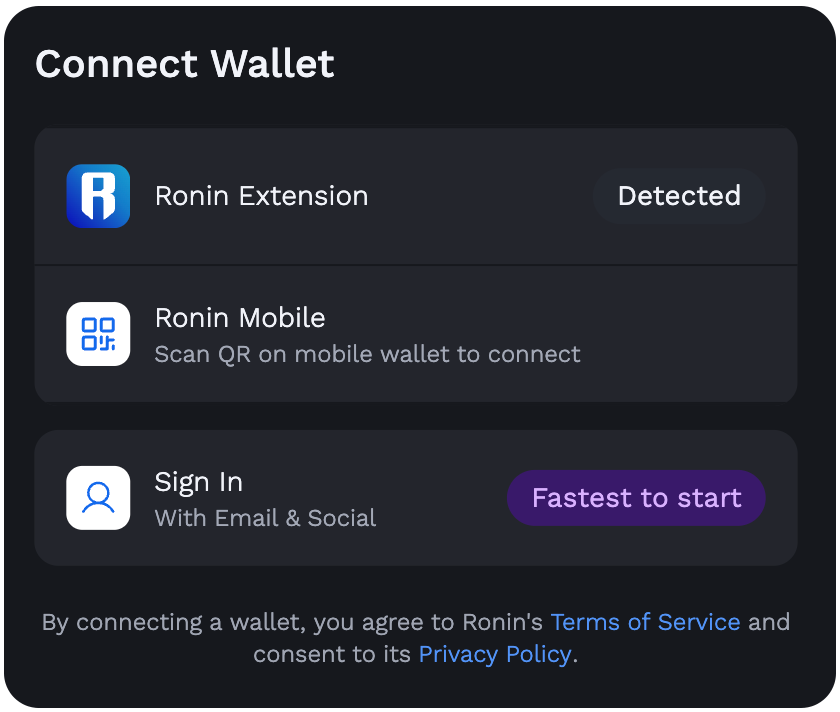
- Extension detected — the site found the Ronin Wallet extension in your browser. One click, the extension pops open, you approve the connection, and the dApp can now see your address and request signatures. It cannot move funds without a per-transaction approval from you.
- Ronin Mobile (QR code) — no extension needed; you scan the code with the mobile app and approve on your phone. Handy on a shared or untrusted computer, since keys never touch that machine.
- Email sign-in (Ronin Waypoint) — an account-abstraction smart wallet created from an email or social login. It's built for onboarding gamers who've never held a seed phrase, and it's a genuinely 2026 approach — but it shifts trust toward the recovery infrastructure rather than your own backup.
A connection is not a blank cheque, but read every signature prompt anyway. The dangerous ones are token approvals — permissions that let a contract spend a token on your behalf — and blind-signed messages from sites you don't recognise. A dApp connection lets a site ask; each transaction still requires your explicit yes in the extension pop-up. If a pop-up appears when you didn't initiate anything, reject it and close the tab.
The most common thing you'll sign is a swap on Katana, Ronin's native DEX — the extension is the standard way to trade RON, AXS, SLP and USDC there, and the Ronin swap guide walks through slippage, fees and the approval flow in detail. Gas for every one of those transactions is paid in RON, the network's native token, so keep a small balance even if you only trade other assets.
Security audit: what the extension does well — and where you're on your own
Permissions and what the extension can see
Like every wallet extension, Ronin Wallet requests permission to read and inject scripts into web pages — that's how it detects dApps and answers their connection requests. It's a broad-sounding permission, and it's exactly why the fake-clone threat is so serious: a malicious extension with the same permissions can read what you see and rewrite what you click. The legitimate extension keeps keys encrypted locally and only exposes signing through user-approved pop-ups; a fake one ships everything to a server in real time. The permission list can't tell you which one you installed — the source of the install can.
Seed phrase and key storage
Your keys are generated locally and stored encrypted in the browser's extension storage, unlocked by your password. That means two practical things. First, browser-level malware and infostealers are your real adversary — an encrypted vault only slows down someone who already has your disk, and a keylogger gets your password anyway. Keep the OS clean, don't run cracked software on your wallet machine. Second, clearing browser data or reinstalling the extension can wipe that local vault — which is fine only if your paper seed phrase backup exists and is correct.
Hardware wallet support
The extension supports Ledger hardware wallets — according to the official Ronin docs, you can pair a Ledger device so that private keys live on the hardware and every transaction requires a physical button press. If you're holding anything you'd be upset to lose, this is the single biggest security upgrade available: even a fully compromised browser can't sign without the device in your hand. Trezor and other vendors aren't supported at the time of writing; check docs.roninchain.com for the current list, because hardware support is exactly the kind of detail that changes between versions.
Locking and auto-lock
The extension locks behind your password and re-locks automatically after a period of inactivity, so a walk-away-from-the-desk moment isn't an open vault. Two habits I'd add on top: lock it manually (open the extension and hit lock) before anyone else touches your machine, and don't let your browser's profile sync log itself into shared computers. Auto-lock protects against the casual snoop, not against malware — treat it as a seatbelt, not armour.
Phishing: the actual threat model
In nine years of watching wallets get drained, I can count the true “extension got hacked” cases on one hand. What actually empties wallets: fake extensions installed from search ads, fake “claim your airdrop” sites that request a malicious approval, fake support agents asking for seed phrases, and users signing things they didn't read. The Ronin ecosystem also carries the scar of the 2022 Ronin bridge hack — roughly $600 million drained from the network's bridge after attackers compromised validator keys. That was network infrastructure, not the wallet extension, and Sky Mavis reimbursed users and rebuilt the validator set — but it's a fair reminder that “audited” and “invulnerable” are different words.
Extension vs mobile app vs Waypoint sign-in
All three are official ways into Ronin, and they're not interchangeable. Here's the honest breakdown — pick by how you actually play and trade, not by what a landing page recommends.
| Browser extension | Mobile app | Waypoint (email sign-in) | |
|---|---|---|---|
| Platform | Chrome, Brave, Edge (desktop) | iOS & Android | Any browser, no install |
| Key custody | Self-custody, local seed phrase | Self-custody, local seed phrase | Smart wallet; recovery via email/social login |
| Best for | Desktop trading, Katana, NFT markets, bridging | On-the-go use, QR logins, in-app dApp browser | Gamers onboarding without a seed phrase |
| Hardware wallet | Ledger supported per official docs | No | No |
| dApp connection | Injected — “Extension detected” | QR scan or in-app browser | Email login in the connect modal |
| Biggest risk | Fake extension clones, browser malware | Fake apps in app stores, phone theft | Trust shifts to account recovery infrastructure |
| Recovery if device dies | Seed phrase (your job) | Seed phrase (your job) | Email/social recovery flow |
My take: run the extension on your desktop as the primary, keep the mobile app as a same-seed companion for approvals away from your desk, and treat Waypoint as an onboarding ramp rather than a vault. Account-abstraction wallets are improving fast — MiCA-era Europe is pushing the whole industry toward friendlier recovery — but “someone else can restore my account” always means “someone else's systems are in my threat model.”
Troubleshooting the Ronin Wallet extension
The dApp doesn't detect the extension
The “Extension detected” option is missing or greyed out. Usual suspects, in order: the extension is installed but not enabled (check your browser's extensions page); another wallet extension — MetaMask, Brave Wallet, Rabby — is hijacking the injection (disable competitors or set Brave's default wallet to “Extensions”); or the page loaded before the extension did (refresh the tab, then reopen the connect modal). Incognito windows also block extensions unless you've explicitly allowed them.
A transaction is stuck pending
Ronin confirms in seconds normally, so a long “pending” usually means an RPC hiccup — the connection between your extension and the network's nodes — or a nonce jam where an earlier transaction never landed. Wait a couple of minutes and check your address on a Ronin block explorer: if the explorer shows it confirmed, the extension's display is just stale, and locking/unlocking or refreshing usually fixes it. If it's genuinely stuck, don't fire five duplicates at it — that's how people pay for the same swap twice.
When to reset — and the one precondition
The nuclear option is removing and reinstalling the extension, then restoring from your seed phrase. It cures corrupted local state, eternal spinners and post-update weirdness. But say it with me: verify your written seed phrase first. The reset wipes the local vault; your 12 words are the only way back in. If you can't find them, do not reset — move funds to a fresh wallet you've backed up properly instead, while you still have access.
Honest cons of the Ronin Wallet extension
No wallet review is worth reading without a cons list, so here's mine after running the extension alongside a dozen others.
- It's an ecosystem wallet, not a universal one. Ronin first, with Ethereum in bridge contexts. If you live across Solana, Cosmos and five EVM L2s, this is your Ronin tool, not your everything wallet.
- Chromium only. No Safari, and Firefox users should verify current availability on the official site rather than assume — distribution is centred on the Chrome Web Store.
- Self-custody has no undo button. No password reset, no chargebacks, no KYC also means no customer service that can reverse your mistake. That's a feature and a cost simultaneously.
- Clone risk scales with popularity. Axie's fame makes “Ronin Wallet” a lucrative name to fake. The burden of installing from wallet.roninchain.com falls on you, every time, on every device.
- The brand carries bridge-hack history. The 2022 exploit didn't touch user wallets and users were made whole, but pretending it didn't happen would be marketing, not analysis.
Ronin Wallet extension — FAQ
Is the Ronin Wallet extension free?
Yes. The extension is free to install and use. You pay network gas in RON for on-chain transactions, and DEX fees when you swap on Katana — but the software itself costs nothing. Anyone charging you to “activate” a Ronin Wallet is running a scam.
Which browsers support the Ronin Wallet extension?
Chrome, Brave and Edge — any current Chromium-based browser — via the Chrome Web Store listing linked from wallet.roninchain.com. Safari is not supported. In Brave, set the default wallet to “Extensions” so the built-in Brave Wallet doesn't intercept dApp connections.
How do I know I'm installing the real extension and not a fake?
Navigate to wallet.roninchain.com yourself (type it, don't click ads) and follow its link to the Chrome Web Store. Verify Sky Mavis as the publisher. Never install from search results, sponsored listings, Discord links or YouTube descriptions — cloned wallet extensions are a standard seed-phrase theft vector.
Can I use the same wallet in the extension and the mobile app?
Yes. Both are non-custodial front-ends to the same keys: import your 12-word seed phrase into the mobile app and you'll see identical accounts and balances. Remember that every device holding the seed is another place it can leak from — secure both.
Does the Ronin Wallet extension support Ledger?
Yes — according to the official Ronin docs, the extension can pair with a Ledger hardware wallet so private keys stay on the device and every transaction needs a physical confirmation. Other hardware brands aren't supported at the time of writing; check docs.roninchain.com for the current status.
Why does my address start with ronin: instead of 0x?
It's Ronin's native address prefix. Under the hood it's a standard EVM address — swap the ronin: prefix for 0x and it's the same account. Explorers, the bridge and most tools accept both forms interchangeably.
What happens if I uninstall the extension — do I lose my funds?
No — funds live on the blockchain, not in the extension. Reinstall it (or any compatible wallet) and restore with your seed phrase to regain access. But if you uninstall without a correct seed phrase backup, the funds are permanently out of reach. Verify the backup before touching anything.
Is the extension custodial? Can Sky Mavis freeze or recover my account?
It's non-custodial: keys are generated and encrypted on your device, and Sky Mavis can't access, freeze or recover them. That's the opposite of an exchange account. The trade-off is that recovery is 100% your responsibility — the seed phrase is the only master key, and there's no forgot-password flow.
Sources & official references
- Official Ronin Wallet site — https://wallet.roninchain.com/
- Ronin documentation — https://docs.roninchain.com/
- Ronin Network — https://roninchain.com/
- Sky Mavis — https://skymavis.com/