
What the Ronin Wallet app actually is
The Ronin Wallet app is the official mobile client for the Ronin chain — the EVM-compatible network Sky Mavis built for Axie Infinity and, later, an entire catalogue of web3 games. It's a non-custodial wallet, which means the app generates a seed phrase on your device and never sends it anywhere: you hold the keys, Sky Mavis holds nothing. That's the opposite of an exchange account, where a company custodies your coins and can freeze the account. Freedom, but also full responsibility — lose the phrase, lose the funds, and no support ticket will fix it.
The app is distributed through the official channels only — the Apple App Store and Google Play, both linked from wallet.roninchain.com. If you haven't installed it yet, I've covered every safe install path (including why I'd avoid random APK mirrors) in the Ronin Wallet download guide. And if you're starting completely from zero, the how to create a Ronin Wallet walkthrough covers the seed phrase ceremony step by step.
One thing to get straight before the review: this is a gaming-first wallet. It manages RON, AXS, SLP, USDC and other Ronin-chain assets, plus NFTs, and it leans hard into game discovery and quest rewards. If you want a general multi-chain wallet for Ethereum L2s and Solana, this isn't it — and the app doesn't pretend otherwise.
What's inside the Ronin Wallet app
The app packs five distinct jobs into one interface. Here's the tour, feature by feature, with my field notes.
Wallet core
Balances for RON and Ronin-chain tokens, send/receive with the ronin: address format, QR codes for receiving, and full transaction history. Addresses are standard EVM addresses under the hood — ronin: is just the chain's prefix convention.
In-app swap
A built-in swap screen routed through Katana, Ronin's native DEX. You can flip RON to AXS or SLP to USDC without leaving the app. Rates and fees match what you'd get on Katana directly — I compare them in the Ronin swap guide.
dApp browser & discovery
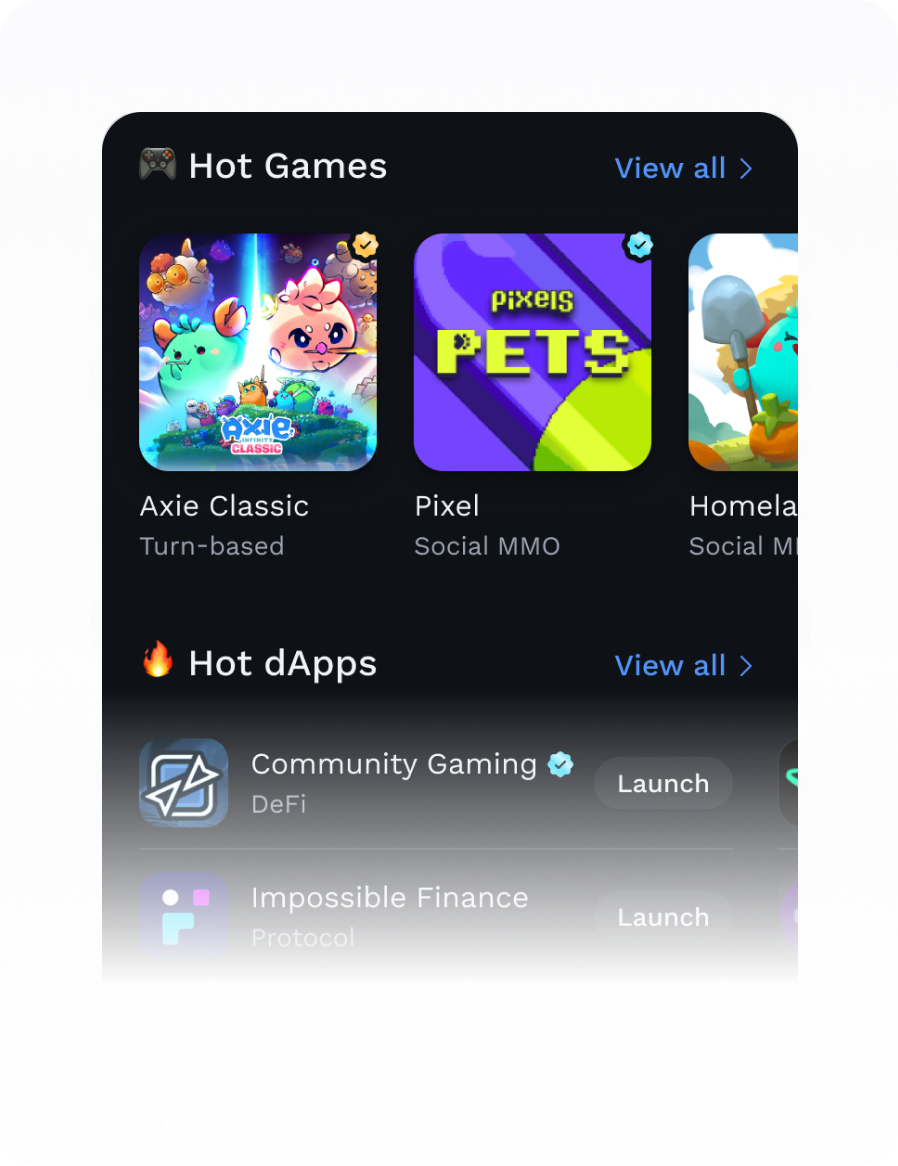
A discovery hub with Hot Games (Axie Classic, Pixels and other Ronin titles rotate here) and Hot dApps rows, plus an in-app browser that injects the wallet into any Ronin dApp you open.
Quests & rewards
A My Quests screen with daily check-ins and game tasks, and a My Rewards screen where completed quests pay out. More on what those rewards are really worth below.
NFT tab
A gallery of your Ronin NFTs — Axies, Pixels land and items, game collectibles — with send support. Viewing is smooth; serious NFT trading still happens on marketplaces, not here.
QR connect to desktop
A WalletConnect-style scanner (Ronin uses the Reown protocol, per the official Sky Mavis docs) that lets the phone approve sessions for dApps running in a desktop browser. Genuinely useful — full steps below.
The app also supports hardware wallets: according to the official docs, you can pair a Ledger via Bluetooth under Settings → Hardware Wallet, so transaction signing happens on the Ledger while the phone is just a screen. If you hold anything meaningful, this is the setup I'd actually recommend.
Ronin Wallet app review: my scoring
I score wallets on what breaks in practice, not on feature checklists. Here's where the app landed after two weeks of daily use on a Pixel and an iPhone.
| Category | Score | Verdict in one line |
|---|---|---|
| UX & onboarding | 8.5/10 | Clean dark UI, wallet created in under two minutes, swap and send flows are obvious |
| Security | 7.5/10 | PIN + biometrics and encrypted local storage are solid; mobile OS risks and clipboard exposure keep it from higher |
| Features | 8/10 | Swap, quests, NFT tab and QR connect cover 90% of what a Ronin gamer needs |
| Quest rewards value | 6/10 | Fun and occasionally pays real tokens, but daily check-ins alone won't buy you lunch |
| Performance | 8/10 | Fast cold start, no crashes in my testing; the in-app browser is the heaviest component |
UX: onboarding and daily speed
Onboarding is the best part. Fresh install to funded wallet took me about ninety seconds: create wallet, write down the 12-word seed phrase, confirm it, set a PIN, enable Face ID. The app also offers a keyless/social-login setup flow for newcomers, but for a wallet you'll actually keep, I'd go classic seed phrase — it's portable to the extension and any future device.
Day to day, the app is quick. Balances refresh on pull, sends confirm in a couple of seconds (Ronin's ~3-second blocks help), and the swap screen quotes almost instantly. My one UX gripe: the home screen mixes your balances with promotional game tiles, so it feels part wallet, part storefront. You get used to it, but a "just my money" view would be welcome.
Security on mobile: the honest picture
The app does the right basics: your keys are encrypted on-device, unlocking requires a PIN or biometrics, and every transaction shows an approval screen before signing. Nothing custodial, nothing phoning your seed home. But mobile is a fundamentally messier environment than a browser profile, and a candid review has to say so.
- Clipboard risk. Copying a
ronin:address or — worse — a seed phrase puts it in the system clipboard, where other apps may read it. Android and iOS have tightened clipboard access, but the habit to build is: never copy your seed phrase, ever. Type it or write it. - Rooted or jailbroken phones. On a rooted/jailbroken device the OS sandbox that protects the wallet's encrypted storage is weakened, and malware with elevated privileges can potentially reach key material. If your device is rooted, don't keep meaningful funds in any mobile wallet — this one included.
- Shoulder surfing and phone theft. A stolen unlocked phone with a known PIN is a drained wallet. Use biometrics, a non-obvious PIN, and keep the seed phrase backup at home, not in your camera roll or notes app.
- Screenshot hygiene. The app discourages screenshots during seed phrase display for a reason. Cloud-synced photo libraries are one of the most common ways phrases leak.
Your seed phrase is the wallet. No Sky Mavis employee, Discord moderator or "support agent" will ever ask for it — anyone who does is a thief. If the phrase touches the internet (screenshot, cloud note, DM), assume the wallet is compromised and move funds to a fresh one immediately.
Worth remembering for context: the 2022 Ronin bridge hack, in which attackers took roughly $620 million by compromising validator keys, was an infrastructure breach — not a wallet-app flaw, and users' self-custodied keys weren't exposed. Sky Mavis reimbursed users and overhauled validator security. It doesn't change how safe the app is, but it's part of the ecosystem's history, and I don't review around it.
Ronin Wallet app vs extension: which one wins where
Most people eventually run both, since one seed phrase works in both (import it once, and the app and the Ronin Wallet extension show the same address and balances). But they're good at different things.
| Task | Mobile app | Extension |
|---|---|---|
| Checking balances on the go | Winner — pocket access, biometric unlock | Desktop only |
| Daily check-ins & quests | Winner — quest hub is a first-class tab | Limited; quests are app-centric |
| Playing browser-based Ronin games | In-app browser works, but cramped | Winner — full screen, injected wallet |
| Approving big transactions | Small screen truncates details | Winner — easier to read contract prompts |
| Swapping tokens | Tie — same Katana routing | Tie — plus easier rate comparison in tabs |
| Connecting to desktop dApps | Winner as the approver — QR scan flow | Native, no QR needed |
| Hardware wallet signing | Ledger via Bluetooth | Ledger via USB/WebHID |
My rule of thumb: the extension is the workbench, the app is the pager. Do your heavy approvals, marketplace trades and rate-hunting on desktop; use the app for quests, quick sends, and confirming logins when you're away from the keyboard.
Quests, daily check-ins and rewards: a reality check
The quest system is the app's signature feature and also the one most wrapped in hype, so let's be precise. The My Quests screen lists daily check-ins and tasks tied to Ronin games — log in daily, play a match of Axie Classic, farm something in Pixels. Completions accumulate on the My Rewards screen, and reward campaigns (Sky Mavis brands the bigger ones "Ronin Bounties") have paid out real prizes: the first bounty season distributed several thousand AXS plus limited-edition Axies, with raffle entries for everyone who finished, according to official Ronin announcements.
Now the no-hype part. The daily check-in by itself mostly builds a streak — it's engagement plumbing, and its standalone payout is negligible-to-nothing outside of campaign windows. The meaningful rewards come in bursts, tied to specific sponsored campaigns, capped in supply, and often competitive (first-come pools plus raffles for the rest). Treat the quest tab as an occasional bonus for things you'd do anyway, not as income. Anyone telling you a wallet's check-in button is a "passive earning strategy" is selling you engagement, not money. If a quest ever pays a token you don't want to hold, the in-app swap converts it to RON or USDC in about thirty seconds.
Battery, permissions and data collection
Nothing alarming here, but you should know what you're installing. The app requests camera access (for QR scanning), notifications, and biometric unlock — a normal set for a wallet, with no location or contacts grab. Battery impact in my testing was modest; the in-app browser is the only component that noticeably works the radio and GPU, so heavy Pixels sessions will warm the phone like any mobile web game.
On data: per the app's own store listings, Ronin Wallet declares limited data collection — categories like identifiers and diagnostics — and states that data is encrypted in transit; the Google Play data-safety and App Store privacy sections are the authoritative, current source, since these labels get updated with releases. The important line: your private keys and seed phrase are not among the collected data. They stay on the device. Blockchain activity, of course, is public by nature — every send and swap is visible on the Ronin explorer regardless of what the app collects.
How to connect the app to a desktop dApp via QR
This flow — phone as the signer, desktop as the screen — is the app's most underrated trick. It uses a WalletConnect-style session (Ronin's docs describe it via the Reown protocol), and it means a desktop browser with no extension installed can still use Ronin dApps, with every approval happening on your phone. Here's the exact sequence.
Open the dApp on desktop
Go to the Ronin dApp in any desktop browser — the Axie marketplace, Katana, or app.roninchain.com — and hit Connect Wallet.
Pick the mobile / QR option
In the connect modal, choose the mobile or QR-code option rather than the extension. A QR code appears on the desktop screen.
Unlock the Ronin Wallet app
On your phone, open the app and unlock with PIN or biometrics. Make sure you're on the account you actually want to connect.
Scan the QR code
Tap the scanner icon in the app and point the camera at the desktop screen. The app reads the session request in a second or two.
Review the connection request
The app shows which site wants to connect and what it can see (your address and balances — connecting alone can't move funds). Check the domain character by character; phishing sites clone dApp interfaces constantly.
Approve and keep the phone handy
Confirm the session. The desktop dApp now shows you as connected, and every transaction it proposes will pop up on your phone for signing.
Disconnect when done
End the session from the dApp or from the app's connected-sites list. Don't leave stale sessions with marketplaces alive for weeks.
The QR flow is also the easiest way to use Ronin dApps on a work or public computer where you can't (and shouldn't) install a wallet extension — the keys never touch the desktop machine.
The honest cons
No wallet review is worth reading without this section. Here's what would make me hesitate, depending on how you'll use it.
- Mobile phishing pressure. Fake "Ronin Wallet" clones appear in app stores and as APK downloads periodically. On mobile you have fewer cues (no URL bar habits, no extension-store badge), so a convincing fake is easier to fall for. Install only via links from wallet.roninchain.com.
- Small-screen approval fatigue. Transaction prompts on a 6-inch screen truncate contract details, and after your tenth quest-related signature of the day you start tapping approve on reflex. That reflex is exactly what drainer contracts exploit. Big or unusual approvals belong on the extension, where you can read them.
- Ecosystem lock-in. The app manages Ronin-chain assets. Your ETH mainnet tokens, Solana NFTs and Bitcoin live elsewhere; this is a specialist tool.
- Quest tab doubles as a billboard. Discovery rows and reward banners make the home screen busier and more promotional than a pure wallet needs to be.
- Self-custody has no undo. No KYC and no gatekeepers also means no password reset and no fraud reversal. That trade-off is the whole deal — accept it consciously.
Who should use the app — and who should stick to the extension
Get the app if you play Ronin games on mobile, want the quest rewards, need balances in your pocket, or like the phone-as-signer QR setup. It's free, well built, and after two weeks I have no stability complaints. Stick to the extension alone if you only interact with Ronin from a desktop browser, mostly do marketplace trading with large approvals, or you simply don't want wallet keys on a device that leaves the house. And in 2026, with account abstraction and smart-wallet flows spreading across EVM chains, expect the mobile app to keep absorbing features first — Sky Mavis has been shipping login and session upgrades (like the Waypoint account system) to mobile ahead of desktop.
Whichever you choose, do the setup properly: seed phrase on paper, PIN that isn't your birthday, biometrics on. The creation guide walks through it, and the login guide covers importing the same wallet on a second device.
Ronin Wallet app — FAQ
Is the Ronin Wallet app free?
Yes. The app is free to download and use on both iOS and Android, with no subscription. You only pay network gas fees (in RON) when you send, swap or interact with contracts — those go to the network, not to Sky Mavis's app.
Is the app available on both Android and iOS?
Yes — it's published by Sky Mavis on Google Play and the Apple App Store. Always follow the store links from wallet.roninchain.com rather than searching, since fake wallet clones do appear. Full platform details are in the download guide.
Can I use the same wallet in the app and the extension?
Yes. Import the same seed phrase into both, and the app and extension control the identical address — same balances, same NFTs, same history. Step-by-step import instructions are in the Ronin Wallet login guide.
What do the daily check-ins actually pay?
By themselves, very little — the check-in mainly builds a streak that feeds into reward campaigns. Real payouts (AXS, NFTs, raffle entries) come during limited Ronin Bounties-style campaigns, per official Ronin announcements. Treat it as a bonus, not income.
Is the Ronin Wallet app safe?
The app itself follows sound non-custodial practice: keys encrypted on-device, PIN/biometric unlock, per-transaction approval, optional Ledger support. The realistic risks are environmental — phishing clones, a rooted phone, clipboard leaks, or a seed phrase stored in your photos. Handle the phrase offline and the app is as safe as mobile wallets get.
Can I swap tokens inside the app?
Yes — the built-in swap routes through Katana, Ronin's native DEX, so you can trade RON, AXS, SLP, USDC and other Ronin tokens without leaving the app. Rates, fees and slippage settings are covered in the Ronin swap guide.
What happens if I lose my phone?
Your funds are safe as long as you have the seed phrase and the thief can't get past your PIN/biometrics. Install the app (or extension) on another device, import the phrase, and you're back in. If you suspect the phrase itself was exposed, move funds to a brand-new wallet immediately.
Does the app work on a rooted or jailbroken phone?
It may run, but you shouldn't use it there. Root/jailbreak weakens the OS sandbox that protects the wallet's encrypted key storage, so privileged malware could potentially reach your keys. Keep wallets on stock, updated devices.
Sources & official references
- Official Ronin Wallet page — https://wallet.roninchain.com/
- Ronin Wallet on Google Play — https://play.google.com/store/apps/details?id=com.skymavis.genesis
- Ronin Wallet on the App Store — https://apps.apple.com/us/app/ronin-wallet/id1592675001
- Sky Mavis docs: connect mobile wallet to dApps — https://docs.skymavis.com/ronin/wallet/tutorials/connect-mobile
- Ronin support: Ronin Bounties — https://support.roninchain.com/hc/en-us/articles/35214075600411-Ronin-Bounties